Knowledge base

How can campers Set Up ACH Payments for Recurring Invoices

What is ACH?

ACH (Automated Clearing House) payments enable campers to make direct payments from their bank account rather than using a credit card. This is similar to paying rent or utilities through an online banking portal, which can be more cost-effective due to lower processing fees.

How to Pay a Single Invoice with ACH

Here's how to pay a single invoice using ACH in just a few easy steps:

  1. Log into Your RoverPass Traveler Account
    Access your account by logging into the RoverPass portal.
  2. Navigate to the Reservations Tab
    Once logged in, click on the ""Reservations"" tab to view your active reservations.
  3. Find your Outstanding Invoice
    Locate the invoice you wish to pay in the ´Payments´and go to the 'Pay Now' section.
  4. Select ""Bank Accounts"" and Add New ACH
    Click on the ""Bank Accounts"" option, and then click the ""+ Add New ACH"" button. This will open the bank details form for you to fill out.
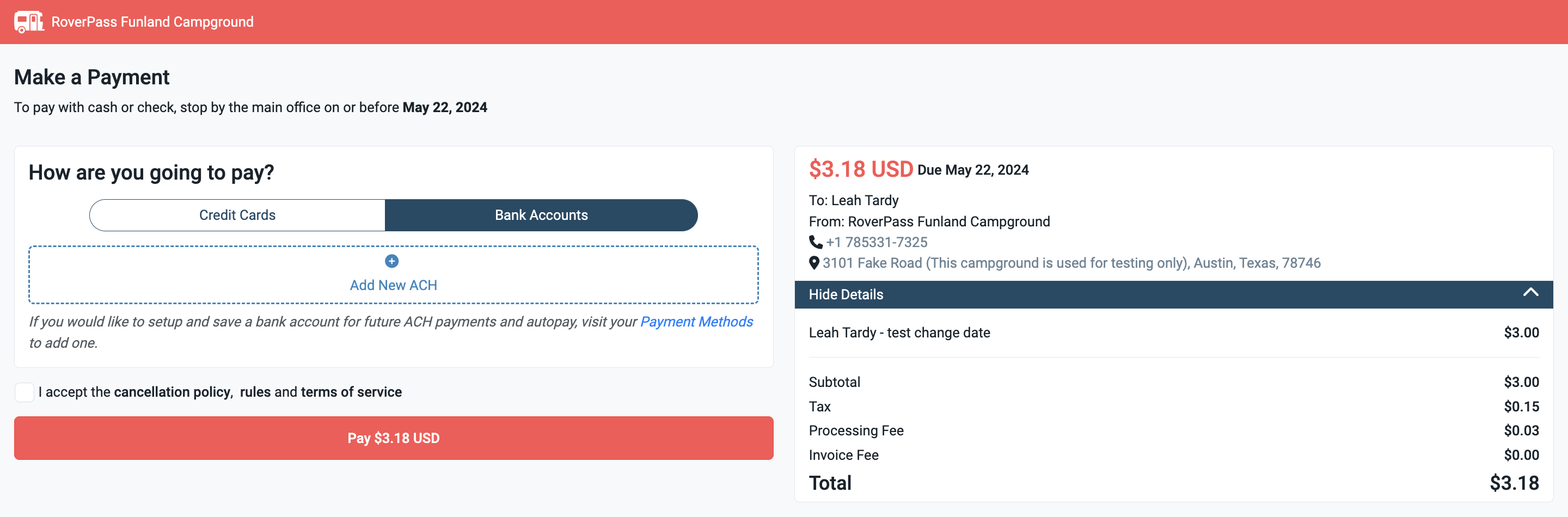
    image-20240709-203257

   5. Complete the Bank Details Form
Enter your bank details in the form, then click “Continue.” This will link your bank account to your recurring invoice.
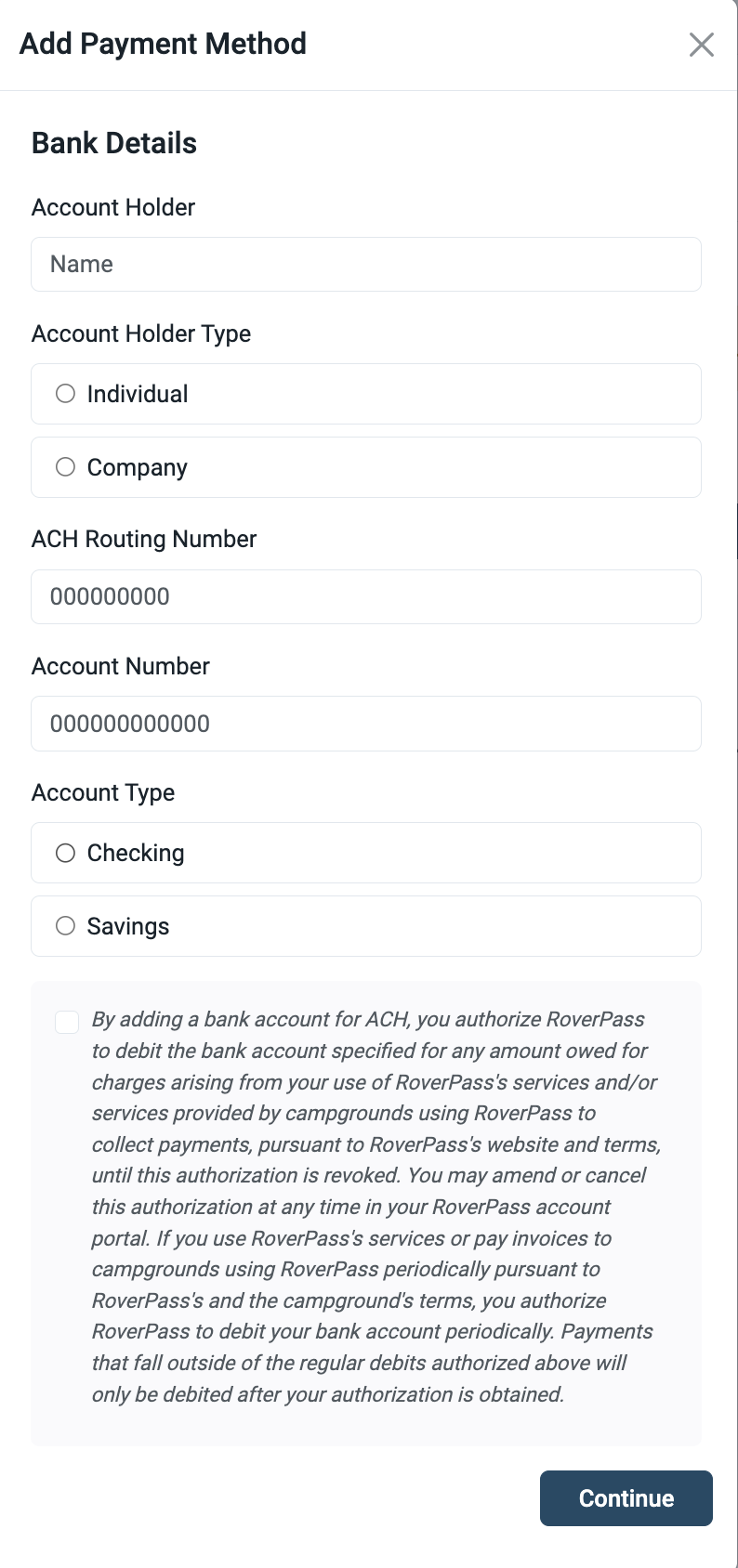
image-20240304-173056

  6. Confirmation
After successfully adding your ACH payment details, your invoice will automatically recalculate the correct processing fee for you to pay.

Setting Up ACH with Autopay as a Camper

To set up ACH payments for your recurring invoices, follow these steps:

  1. Log into Your RoverPass Traveler Account
    Access your account by logging into the RoverPass portal.

  2. Navigate to the Reservations Tab
    Once logged in, click on the ""Reservations"" tab to view your active reservations.

  3. Go to the Payments Tab
    Inside the reservation details, select the ""Payments"" tab at the top. You’ll find options for managing your payment methods.

    image-20240709-203257

    4. Select ""Bank Accounts"" and Add New ACH
Click on the ""Bank Accounts"" option, and then click the ""+ Add New ACH"" button. This will open the bank details form for you to fill out.


    5. Complete the Bank Details Form
Enter your bank details in the form, then click “Continue.” This will link your bank account to your recurring invoice.

image-20240304-173056

6. Confirmation
After successfully adding your ACH payment details, your recurring payments will be automatically deducted from your bank account on the billing due date each month.


Other Ways to Set Up Autopay for ACH

You can also enable autopay for ACH payments directly from the reservation overview or by navigating to the “Autopay” tab in your account.

image-20240304-173046

  • Autopay Setup via the Reservation Overview: If autopay is not already set up, you'll see a reminder to set it up. Click on the notification and follow the prompts to enable ACH autopay.

    image-20240708-190903

  • Autopay Setup via the Payment Methods Tab: Campers can set up their ACH payment method to use across different reservations, ensuring they only have to enter their bank details once.

  • image-20240709-205005


ACH Payment Processing Time

ACH payments typically take 3–5 business days to process, although we recommend allowing 4–7 days for the funds to be fully processed and visible in the campground’s account.


InfoImportant Considerations:
  • Processing Fees: ACH transactions incur a fee of 1%, with a maximum fee of $5. This is usually lower than typical credit card processing fees.

  • Limitations: ACH is available for campgrounds within the United States using USD and can be used for reservations over 27 nights or for flexible reservations.  Campgrounds will have the option to turn off ACH payments.

ACH Refunds 

Refunds for ACH payments can take up to 4 business days to process. Only one refund per per camper can be processed at a time, meaning campgrounds need to wait for the first refund to complete before issuing another.


    • Related Articles

    • How To Contact RoverPass Customer Support (for campers)

      Camper Reservation Support Guide This article is for campers who have booked or are planning to book a stay through RoverPass. Need Help With Your Reservation? Most reservation-related requests can be handled directly by the campground where you're ...
    • How to Submit a Cancellation for a Reservation

      Step 1: Login to your RoverPass account If you have never set up a RoverPass account, you can enter the email address that you made your reservation with, send yourself a password reset token, and upon logging in, your reservation(s) will already be ...