How the Hipcamp Integration Works
Everything you need to know and expect if you receive a reservation from Hipcamp, a RoverPass partner.
RoverPass continues to build its distribution network to get your property in front of as many campers as possible. Learn more about Hipcamp below!
Who/What is Hipcamp?: Hipcamp is a platform used for discovering and booking unique outdoor stays including tent camping, RV parks, cabins, treehouses, and glamping.
What is the Hipcamp/RoverPass Reservation Process?
- A Camper is browsing Hipcamp for a Campground
- They find one they like, and it’s a RoverPass Campground
- The Camper creates a reservation and pays Hipcamp
- Hipcamp sends the Camper and the Campground a confirmation email. This email is informational only, your RoverPass calendar will be updated with the reservation.
Why Are You Offering This Integration / Why Should I Want to Use it?: In the age of technology, we believe that missing a reservation should never be because campers don't know that your property is an option... regardless of marketing budget! RoverPass continues to build partnerships throughout the industry to ensure that, no matter what website a camper might be searching when they are planning their trip, that your property comes up as an option. What's better?!?!... as a RoverPass customer, our integration allows campers to book your property through Hipcamp with no extra hassle or cost to you. Read on to understand how.
How Does it Work?:
- Our team works with Hipcamp to create a listing for your park on their site. Using a lot of the same technology that we use for our Channel Manager*, we connect your RoverPass account with your Hipcamp listing. Once activated, rate information and availability information sync seamlessly between RoverPass and Hipcamp. This means that campers can book your park on Hipcamp and an Inventory Hold will show up on your RoverPass calendar without you ever having to worry about double bookings.
- *While we work with Hipcamp to initially set up your listing and the integration maintains your rates and availability going forward, you are free to update anything else on your Hipcamp listing (such as Tax Rate, Extra People Fees (and count), Maximum Night Stay, Pet Fees (and count), Add ons, Deposits, Photos, Description, Cancellation Policy, etc) by logging into your Hipcamp account (login provided upon activation).
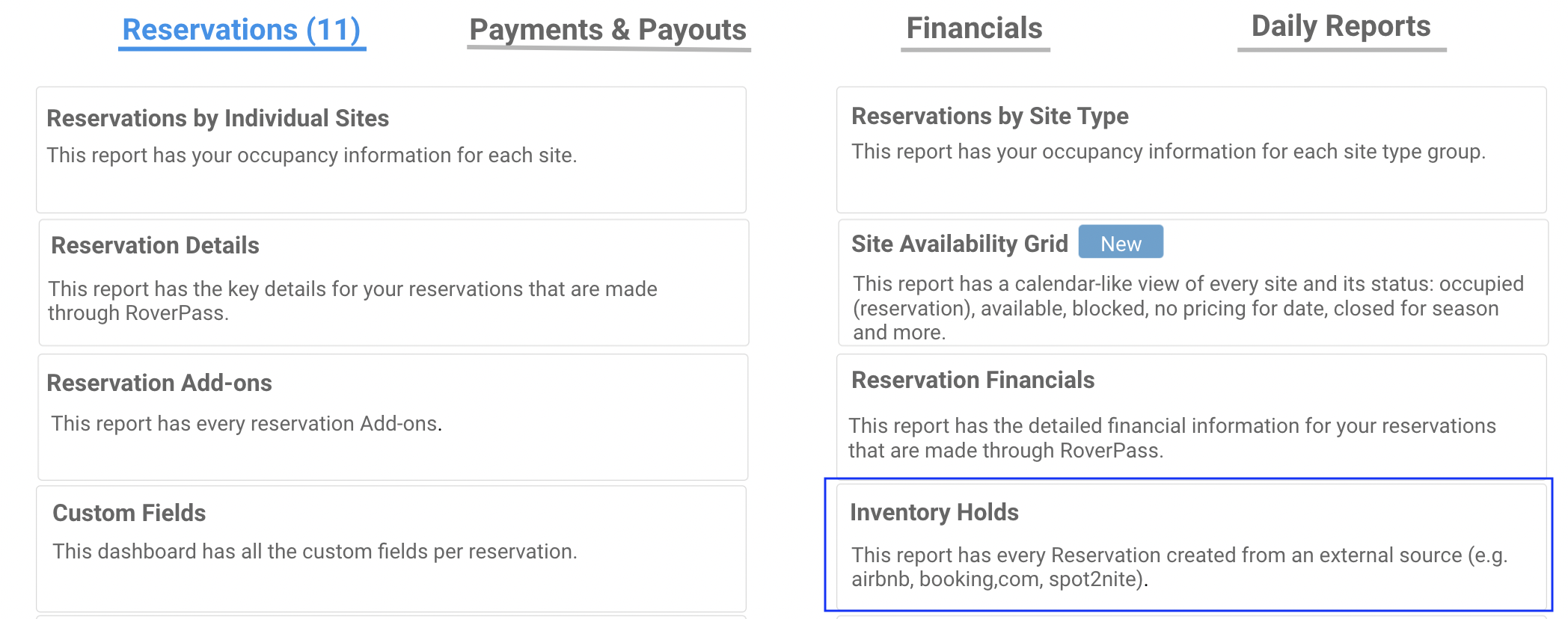
- As soon as a camper books on Hipcamp, an Inventory Hold will show up on your RoverPass Calendar. You will be able to see any reservations that come from Hipcamp:
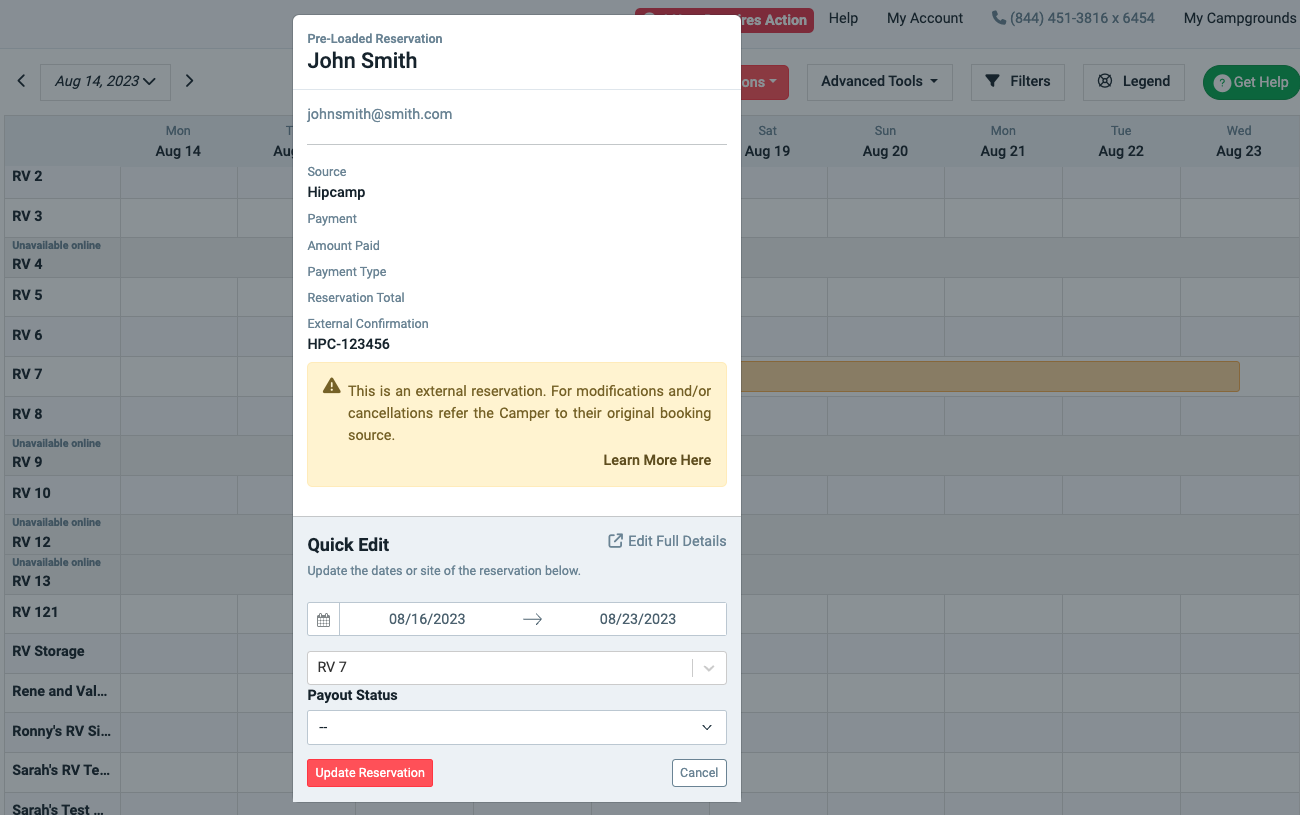
- You can click on the Inventory Hold from the RoverPass Calendar to see basic information:
- Hipcamp will take payment for the reservation on the Hipcamp platform to provide a seamless booking experience to the camper. The money will then paid out to you directly through your Hipcamp Account. You will receive the same payout amount that you would if the reservation had come directly from the roverpass.com Marketplace.
FAQ:
Q: What are the requirements to be listed on Hipcamp?
A:
- Be a RoverPass Inventory Campground (Your RoverPass Dashboard will read ""Your RoverPass System: CRS - Central Reservation System"" or ""Your RoverPass System: Marketplace Inventory).
- Opt into RoverPass Marketplace to be bookable on the RoverPass Marketplace (roverpass.com). This is usually done at the time of initially signing up with RoverPass.
- Make sure that you have at least 2 sites that are:
- Available for short term bookings (less than 7 days in length)
- Available Online for bookings (not indefinitely blocked or disabled)
- Have only 1 rate attached (you can find and edit the number of rates attached to each site under ""Reservation Setup > Sites"" in your RoverPass Owner Portal).
- Accept Hipcamp Terms of Service through the RoverPass Owner Portal (you will see a pop-up in RoverPass where you can do this)
Q: How do I get listed on Hipcamp?
A: Just ask! All inventory parks that meet the above criteria get listed on Hipcamp as part of the RoverPass Onboarding Process. If you for some reason requested not to be on Hipcamp and have now changed your mind, just reach out to our Support Team and we will be happy to get you listed!
Q: Do I need to / can I purchase the RoverPass Channel Manager to be listed on Hipcamp?
A: No.
- BookOutdoors, Spot2Nite, and Hipcamp are considered partner OTAs and managed differently than non-partner OTAs. Use of the Channel Manager (for each partner channel) is included with the marketplace agreement to be on the Partner OTAs.
- Purchasing the Channel Manager is only required when you want to link a non-partner OTA (Expedia, airbnb, booking.com, or VRBO). The Channel Manager as a product is only sold for connection to Expedia, airbnb, booking.com, or VRBO.
Q: I am already listed on Hipcamp... Can I link my existing Hipcamp listing to RoverPass or do I need to get a new one?
A: Just let us know that you already have a Hipcamp listing and we will be happy to work with Hipcamp to link your existing Hipcamp listing. You must still opt into the RoverPass Marketplace program (talk to a Sales Representative) to connect your Hipcamp listing.
Q: What is an Inventory Hold?
A: This object resembles a reservation, but it holds only minimal information as its main purpose is to place a hold on a site for particular dates to ensure that you do not get double booked. When you receive an Inventory Hold from an integrated OTA, this signals to you that the reservation itself was taken on a different OTA (see source) and blocked on your RoverPass Calendar to ensure that inventory is held to serve the reservation that you received from Hipcamp.
It is important that you do not edit an Inventory Hold directly as you cannot take payment or perform a refund on an Inventory Hold. Instead refer your guests to their source OTA for any necessary adjustments (cancellations, refunds, adding more people, any change that needs to be done to the original reservation).
The integration with Hipcamp syndicates inventory (via Inventory Holds) and pricing information, but does not completely transfer all information (payments, photos, descriptions, etc) to make sure that the integration is as reliable and fast as possible. This allows you to be on multiple platforms at once without concern for double bookings. You don't have to manually sync reservations between RoverPass and Hipcamp.
Q: Can I change the site for the reservation?
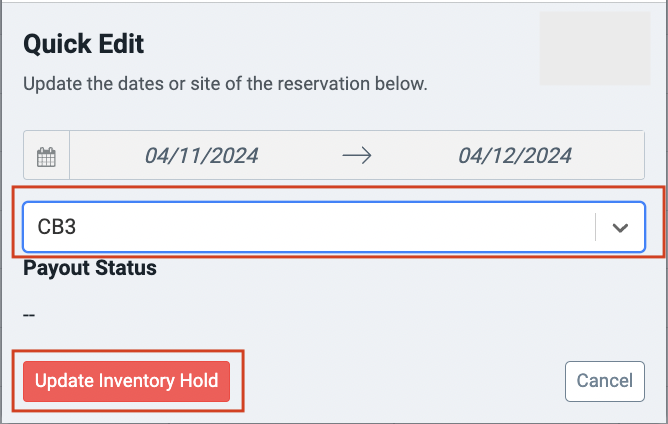
A: Yes, you certainly can! You'll notice the process from the RoverPass Reservation Calendar Quick Edit is the same as it would be to move a Real RoverPass Reservation.
Q: The camper wants to make modifications (change the dates, shorten the reservation, add people, add pets, upgrade the site type, etc) or cancel the reservation. What should I do?
A: Refer them to Hipcamp. Since payment originally went through Hipcamp, any adjustment beyond a site change of the same price needs to be done on the original booking source (Hipcamp). Once the adjustment is made on Hipcamp's side, the integration will update it on your RoverPass Calendar.
Q: I want to give the camper a refund.
A:
- If this refund is for something in line with your stated policies (such as a cancellation that meets your cancellation policy), Hipcamp will automatically refund the camper in accordance with your listed policies.
- If this refund is for an exception to your stated policies (maybe the camper was unhappy with their site and you want to offer them a refund. Or maybe the camper wanted to check out a day early and you wanted to offer a refund even though your cancellation policy normally would not allow it), reach out to Hipcamp to authorize the exception and request the refund to the camper.
- For further information on how to issue a refund through Hipcamp, reach out directly to the Hipcamp Support Team.
Q: The camper wants to extend their stay after having checked-in. What should I do?
A: Simply create a new reservation in your RoverPass Calendar for the extra dates and process it as you usually would.
Q: How do I know the rig and occupancy information?
A: This information is sent to you in the Hipcamp Confirmation email as well as available via your Hipcamp account.
Q: Should I collect payment for these reservations?
A: No. For reservations generated through Hipcamp, payment is collected in full by Hipcamp.
Q: When will my payout be processed?
A: Hipcamp will send your Payout directly to you via your Hipcamp account. Your RoverPass Marketplace Fee will already be deducted prior to payout to you. You'll get paid for a booking the Tuesday following the Hipcamper's checkout date. We initiate payouts around 3 pm PST, and it takes a few hours to run through them all, so don't worry if you don't see your payout notice right at that time.
Hosts have two options for payment:
- Direct Deposit: These transactions oftentimes take 24-48hrs, so you might not see the payout appear in your account until the next day or two. We do not recommend using a savings account for direct deposit as it can cause issues with deliverability.
- PayPal: PayPal tends to deposit funds within 2-4 hours of payouts being issued.
Q: How do I get in touch with Hipcamp's Support?

See also:
Hipcamp Video Instructions & FAQs
- Click here request a password reset.
- How to log in for the first time
- Payouts: Please follow these steps to set up your preferred payment method. Hipcamp will send payouts directly to you: Check your payout status
- Extras: Please make sure your extras policies (adults, children, pets, vehicles) are correct. Update Extra Fees settings
- Cancellation Policies: Hipcamp has structured cancellation policies. If your RoverPass cancellation policies are structured, your Hipcamp account was created with the closest one. If your RoverPass cancellation policies are freeform, Hipcamp has added the most restrictive one Update Cancellation Policies
- Hipcamp will collect and remit your taxes directly. Taxes will not be sent to you in the payout Update taxes here