Knowledge base

Override a Price or Add a Manual Discount

Not happy with the calculated price for some unusual reason? No worries... you are in control and it is now easier than ever override a price in the Reservation Builder.

Step 1:  When creating a reservation from the RoverPass Owner Portal, locate and click the ""Edit Amount"" Button in the cart. 
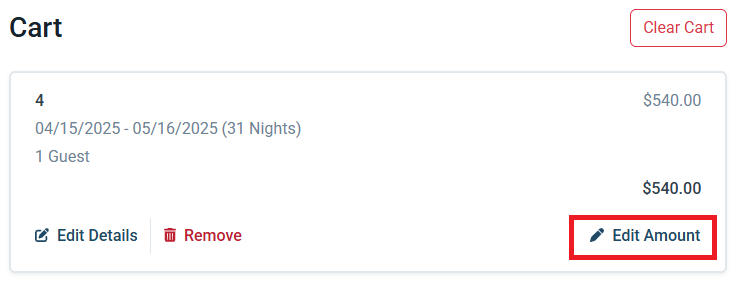
Editting the amount in an online shopping cart

Step 2: Adjust the 'Price,' 'Discount', and/or 'Tax Rate' fields to reflect the amount that you would like to charge the camper
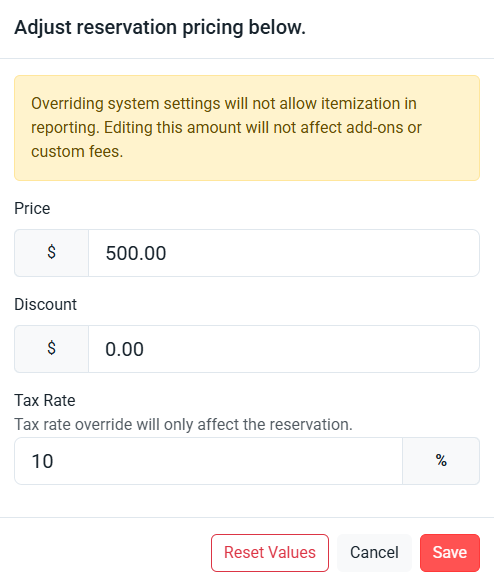
Adjusting reservation price in the RoverPass CRS dashboard

Step 3: Click 'Save'.

Warning

Please Note: Overriding system settings will not allow itemization in reporting. Editing this amount will not affect add-ons or custom fees.

Tax rate override will only affect the reservation.


    • Related Articles

    • How to Add Discount Clubs Offered at my Campground to my RoverPass Listing

      Campground Discounts Offering discounts is a great way to attract new campers, encourage repeat visits, and reward specific groups of guests. Whether you're offering discounts to members of a national organization or creating your own promotions, ...
    • Adding Electrical Fees to Invoices Manually

      How to add Electrical Fees manually in RoverPass. Simply apply these fees to your guests monthly invoices to collect payment. Charging Electric Fees on Invoices: Step 1: Locate the invoice that you want to add an Electrical Fee to Step 2: In the ...
    • Adjusting the Tax Settings on Your RoverPass Account

      How to Manage Tax Settings in RoverPass RoverPass gives you control over the tax settings applied to your reservations, products, and fees. You can configure your tax rates based on your property's requirements and update them at any time. Please ...
    • How to Add, Edit and Archive Sites

      How to Use the 'Sites' tab in your RoverPass Owner Portal to edit your individual Site details and add new sites. Do you need to edit your park's Site details or create a New Site? You can do so using the Sites tab in your RoverPass Owner Portal! ?️ ...
    • How to Use Coupon Codes

      You can now create and manage Discount Coupons right from your dashboard! These can be general codes anyone can use or personalized ones made just for a specific camper. ? Where to Find It In your dashboard, look for Coupon Codes in the left-hand ...