Learn to Use your RoverPass Reports
Heads up: RoverPass has a new reporting portal that replaces the older reports described below — with tables, pivots, KPI cards, filters, and CSV/Excel exports. See Using the New RoverPass Reports Portal for the current experience.
This article will discuss the various reports that are available in the owner portal and the steps to access them.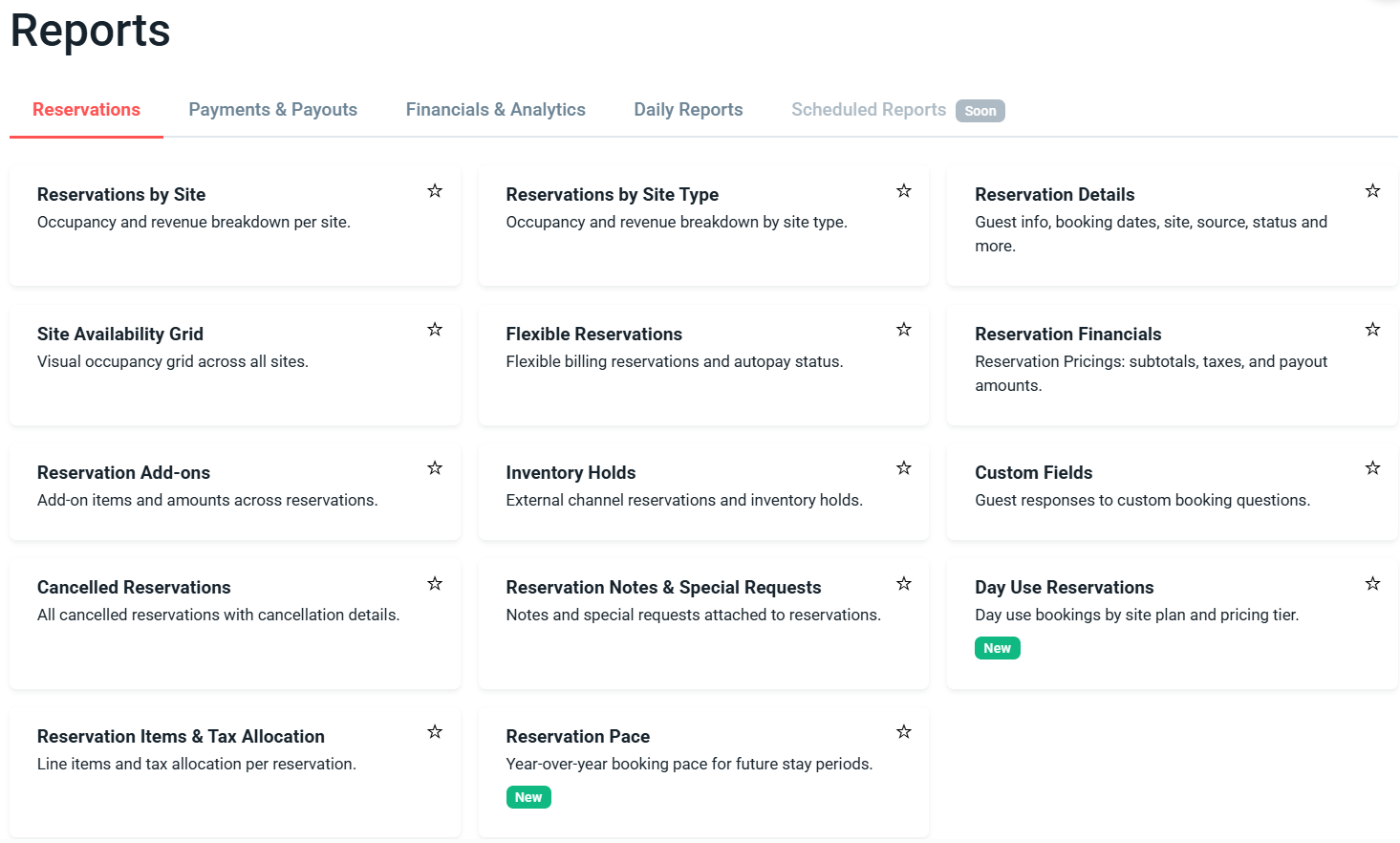
How to Navigate to the 'Reports' Tab and Export a Report from your Portal:
Step 1: Login through the RoverPass Owner Portal Sign In Page
Step 2: Select the 'Reports' tab on the left hand side
Step 3: Decide which report you would like to open and click on it
Step 4: The report will open in the webpage
Step 5: Apply any filters using the drop downs and right click to sort.
Step 6: To export click the 3 small dots in the right hand corner or right click in the report. Choose the version that you would like to download.
Step 7: The report will download to the Downloads folder on your computer or open in Google Sheets.. Double click to open the file if downloaded.
*Note: To properly display the report you will need to open the document in a spreadsheet application like Excel or Google Sheets.
The Different Reports in your RoverPass Owner
-
Reservations
A comprehensive set of reports providing detailed information on reservations, occupancy, availability, financials, taxes, add-ons, cancellations, and custom fields—covering all aspects of reservation management. It currently has 13 reports:
Reservations by Individual Sites
This report has your occupancy information for each site.
Reservations by Site Type
This report has your occupancy information for each site type group.
Reservation Details
This report has the key details for your reservations that are made through RoverPass.
Site Availability Grid
This report has a calendar-like view of every site and its status: occupied (reservation), available, blocked, no pricing for date, closed for season and more.
Flexible Reservations
This report contains detailed information on reservations with flexible check-out dates.
Reservation Financials
This report has the detailed financial information for your reservations that are made through RoverPass.
Reservation Add-ons
This report has every reservation Add-ons.
Inventory Holds
This report has every Reservation created from an external source (e.g. airbnb, booking.com, spot2nite).
Custom Fields
This dashboard has all the custom fields per reservation.
Cancelled Reservations
This report has the details for every cancelled reservation including the reason, cancelled date and the payment/refund status.
Reservation Notes
This report has every reservation note & the ability to filter by reservation, title and date.
Day Use Reservations
This report has the details for every day use reservation, including the reserved date, site plan, pricing tier, and payout amount.
Reservation Items & Tax Allocation
This report has the items (Site, Discounts, Extra Fees, Products) for every Reservation, with individual quantities, amount and allocated tax.
-
Payments & Payouts
Reports covering all aspects of payments and payouts, including direct deposits, checks, custom payments, invoices (voided and detailed), bank transfers, and payment summaries, giving you a clear view of how and when you get paid.. It currently has 10 reports:
Payouts
Shows all RoverPass payments sent to you, including when each payment was initiated.
Payouts for Custom Payments
This report will list all payouts for ONLY custom payments.
Check Payouts
This dashboard has all the Reservations that have been paid out using a monthly mailed check.
Invoice Details
This report provides item details (reservation, electric fees, custom) for every non-voided invoice, including category and reservation/invoice filters.
Voided Invoices
This report has every Invoice that has been voided, including invoice and reservation details.
Direct Deposit Payouts
For direct deposit accounts, this report has the reservations that have been paid out and includes the details for each transfer or reversal.
Payment Mix
Payment Summary Report: Includes monthly details by payment source and other key metrics.
Bank Transfers
For direct deposit accounts, this report has all transfers made to your bank accounts in a format designed to be uploaded to QuickBooks.
Pending Check Payouts
This dashboard has all the Reservations that will be paid out in the upcoming monthly mailed checks.
Cash & Check Payments
This report has every Cash and Check Payment, with the ability to filter by Check name / description.
-
Financials
Reports covering revenue, fees, refunds, subscriptions, and all transactions. Provides a full view of financial activity, performance metrics, and upcoming charges. It currently has 8 reports:
Client Account Balances
This dashboard has the custom fees per reservation.
All Transactions Report
This report has every transaction: Payments, transfers, refunds, reversals, payouts, check payouts.
Occupancy & Revenue
Report with Revenue and Occupancy figures (including statistics like ADR, RevPas) and the ability to compare to prior periods. Revenue is calculated based on actual payout amounts from completed payments, including cash/check payments. Refunds are not included.
Fees & Tax Breakdown
This report has the Fees & Tax breakdown for every Reservation and General Store Purchase.
Refunds
This report shows every Refund, including the reason, refund subtotal, tax refund and total amount refunded.
Rent Roll
This report has upcoming invoices, with due date, amount and description. Perfect to analyze long term site holders data.
Subscription Details
This report has the monthly subscription details: Past and upcoming bills, discount calculation and more.
Ancillary Fees Collection
This report has the fee collection details for reservations paid using cash / check, disputes, channel management and ownership changes.
-
Daily Reports
Reports focused on daily operations, including arrivals, departures, current guests, guest details, store sales, inventory, and marketing performance. Helps monitor day-to-day activity and campground engagement in real time. It currently has 7 reports:
Arrivals
This report has all the upcoming arrivals, and a date filter to get historical data.
Departures
This report has all the upcoming departures, and a date filter to get historical data.
In House Report
This report shows inhouse guests (including children and pets) and the list of every reservation currently on site.
Marketplace Page Views
This report has traffic statistics on the Campground's Marketplace listing, including page views, booking page views, reservations and conversion rates.
Guest Details
This report has the details of every single camper, including number of reservations, first and last reservation, and contact information such as email and address.
General Store Purchases
This report provides detailed information on every General Store purchase, with a breakdown of each item.
General Store Inventory
This report provides a comprehensive overview of all items currently in stock at the General Store, including quantities, item details and units sold.