Knowledge base

How to Use the Dynamic Pricing Feature in Your Owner Portal

Heads up: RoverPass has upgraded to Advanced Dynamic Pricing, which replaces the older pricing setup described below with customizable, per-tier occupancy rules. For the current feature, see NEW Advanced Dynamic Pricing. The information below is kept for reference.

By carefully selecting the Dynamic Pricing strategy and the Site Types to apply it to, you can effectively manage your campground’s revenue and occupancy rates.

Dynamic Pricing increases your nightly rates based on the occupancy level of your campground.

Pricing Strategies

You can choose from three predefined pricing strategies: Conservative, Moderate, and Aggressive. Each strategy has different rate increases and occupancy thresholds:
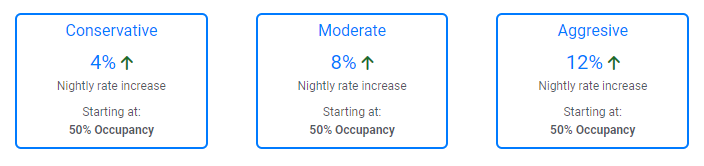
  • Conservative Strategy: This strategy is ideal if you prefer a gradual increase in pricing as your campground begins to fill up.
  • Moderate Strategy: Choose this strategy for a balanced approach, offering a moderate rate increase once your occupancy reaches 50%.
  • Aggressive Strategy: For maximum revenue potential, select the Aggressive strategy, which significantly increases rates as occupancy hits 50%.

How to set up your Dynamic Pricing strategy:

  1. Choose one of the three predefined strategies (Conservative, Moderate, or Aggressive) that best fits your campground’s needs.
  2. Review the Site Types listed under your chosen strategy.
  3. Check the boxes next to the Site Types you want the Dynamic Pricing strategy to apply to.
  4. Uncheck the boxes for any Site Types you want to opt out of the Dynamic Pricing strategy.
  5. Click the Save Configuration button to apply your changes.
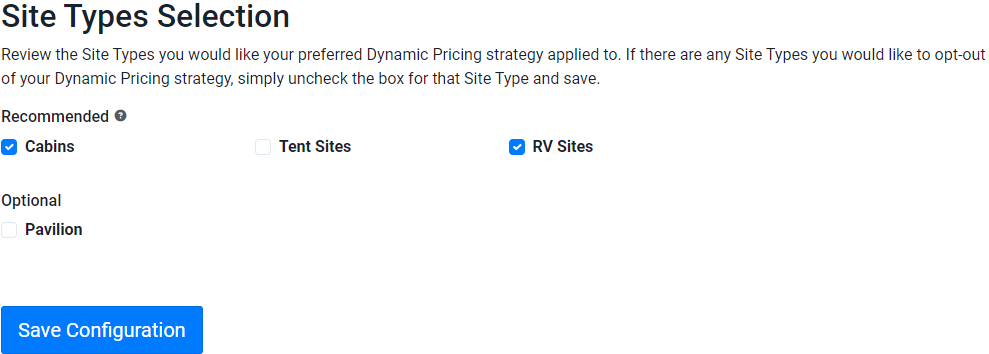
 Select site types like Cabins or RV Sites to apply Dynamic Pricing before saving settings.

    • Related Articles

    • How to Update Your Rates in Your RoverPass Owner Portal

      This guide will walk you through updating your site pricing and policies, including adding Site Plan rules and extra fees, directly through the Rate Editor. Say goodbye to calling Customer Support for fee updates! Year Round and/or Seasonal Pricing ...
    • Day Use Online Reservation Capabilities Directly in the RoverPass App!

      Learn how to use RoverPass to offer online reservations for Events, Day Passes, Facilities, or other Daily Rentals! What is it?: RoverPass offers an integrated solution for managing day-use reservations, allowing parks to offer facilities and rentals ...
    • NEW Advanced Dynamic Pricing

      Automatically adjust your nightly rates based on occupancy — filling empty sites with smart discounts and maximizing revenue when demand is high. Note: Dynamic pricing applies to stays of 6 nights or fewer. Each night in a stay is priced ...
    • RoverPass General Store Feature

      The RoverPass General Store feature enables your campground to process general store sales through our platform, keeping all of your business tools in one place! This new feature addition has several advantages for your campground! It includes access ...
    • The Guestbook Feature

      Use the Guestbook feature to pull up your guest's previous reservation information and have it autofill information while creating their new reservation! Do you have return campers that stay with you multiple times a year? Many Campground Owners ...